Usually Google Pagespeed Core web vitals metrics suffer because of two main reasons, large website page size (due to unnecessary code and un-optimised code, in both JS and CSS, and also un-optimised Images and assets – gif, video, images), and second reason is, Core web vitals suffer because of not using the latest browser techniques like Cache, Preload, Lazyload, Prerender etc.
We had this situation, a company website wasn’t passing the core web vitals, as per our analysis, the website loaded single CSS (styles.min.css) and another single JS file (script.min.css) Both these files were heavy in size (1500Kbs to 2000Kbs).
From our analysis, we realized that this website was loading JS for the entire websites functions on every page. Most pages used only some part of this JS code, and the rest of the JS code was being loaded unnecessarily and it was taking unnecessary execution time on browser as well as loading time, which was the reason some parameters in Core web vitals were scoring low.
We decided to fragment the JS code to reduce the total execution time.
How we did this, is by using Webpack build system, Webpack is a nodejs package, it can be installed using npm package manager,
We can use this package to manage our JS and CSS code, it can be done by modularizing the JS and CSS code into various components and separating functions that are needed on various pages.
By separating, we avoid putting all the JS features in one file, and loading it on all pages of the website, causing delayed rendering and thus affecting core web vitals.
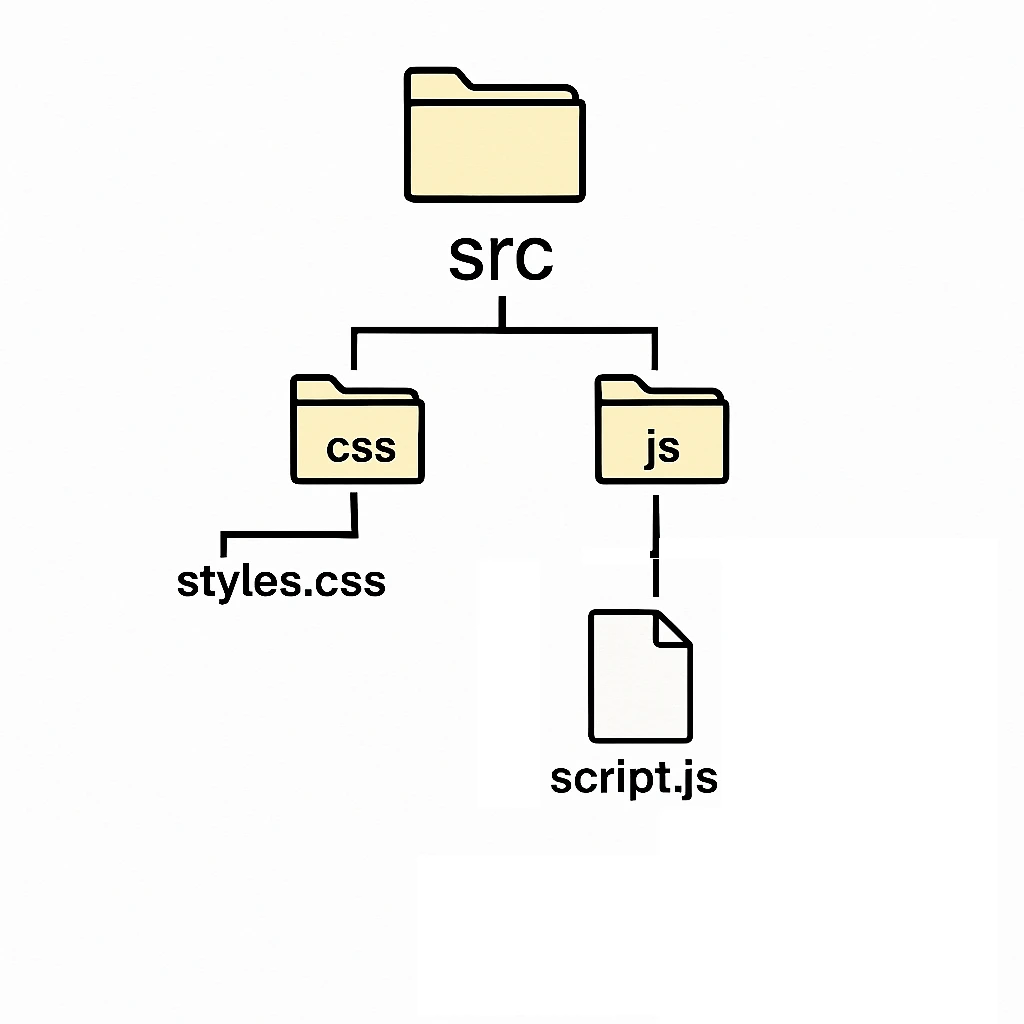
We had a single CSS and JS build file for this entire website. Its folder structure looked like this
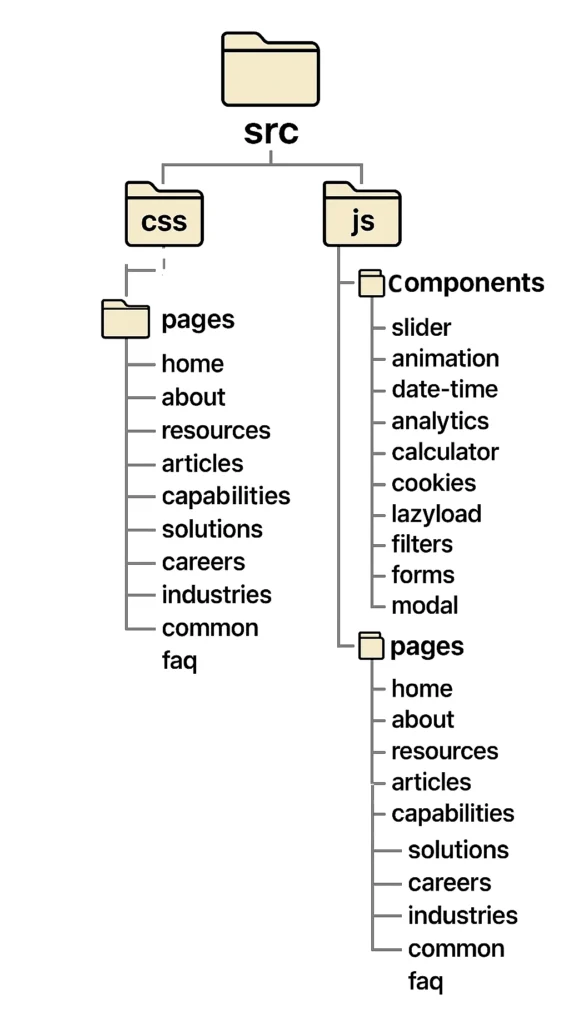
We decided to divide the JS code to their individual modules / features and assorted code specific for pages by pages each.
Using the [import / require] feature of webpack we ensured the right functions / components were added to a page JS during the build process. During build webpack adds the import libraries code to output JS file. Now we can only import a feature code if its required by a module on a page.
So after creating separate JS files in the codebase, the new folder structure looked like below
After setting up the necessary folder structure for input, output files, and webpack configuration file, along with main package.json file to include webpack in the project build. We were now able to run the regular npm run build command. The build process ran and took care of
After this, we followed the standard Webpack installation process, then we created the necessary config files for Webpack. Then we ran the npm build command to run the Webpack build process. In the Webpack config file we imported minification and code optimization npm plugins available,
| For CSS Processing, we used following packages | For JS Code compatibility with older version of JS | We used following package for JS optimisation |
css-loader | @babel/core | terser-webpack-plugin |
style-loader (for dev) | @babel/preset-env | |
mini-css-extract-plugin (for production) | babel-loader | |
postcss | Optional: core-js (for polyfills) | |
postcss-loader | @babel/plugin-transform-runtime | |
autoprefixer |
So in summary, Ideally Webpack build can do these 3 things, which are great to create a lightweight website load size.
| Dependency injection | Minifying code | Code optimization |
| Using import / request, adding library and components scripts to output file | To remove whitespace, remove line breaks | rename variables, remove unused code, remove console logs if configured |
We can configure the Webpack rules to save the output files to a /dist/ folder inside our theme folder. We can then reference these files to each page separately. We did this by using wp_enqueue_scripts and wp_enqueue_styles hook and attached them to various pages.
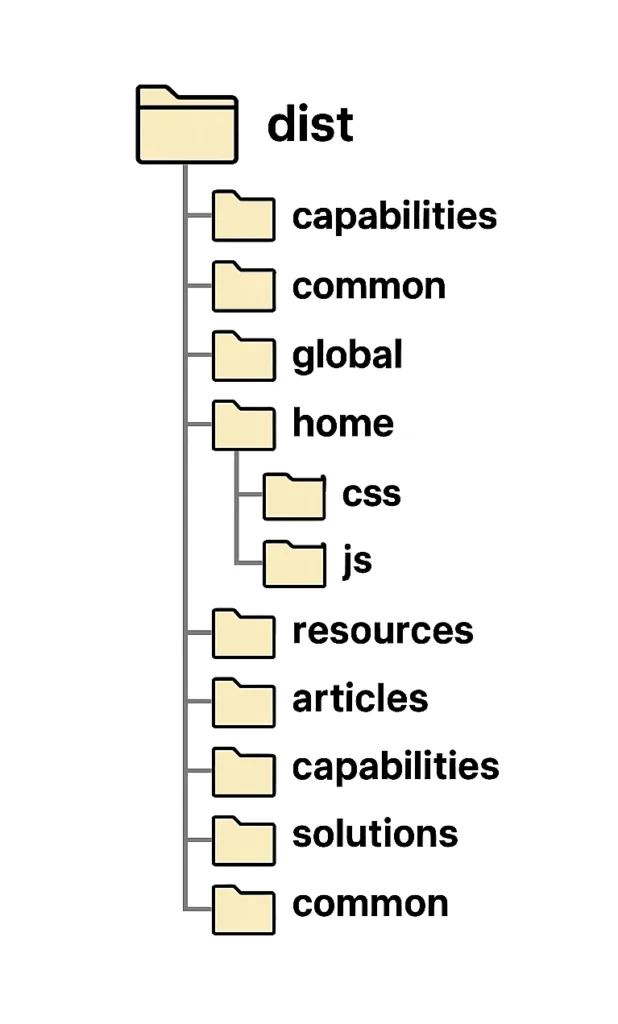
This was able to reduce the total JS files size for each page by 60 – 80%.
This along with some other techniques I have written extensively about them in another blog post here, > the website passed Core Web Vitals and Increase Pagespeed Score to above 95+ for Desktop and in the range of 90+ for Mobile.
Leave a Reply