💡 Idea
I am going to share my experience of building an Android app from scratch for an idea I had for a year, its launch – development and its demise.
Back in 2018, I had thought of a camera application which would scan a page of paper and convert written information from paper to a digital format.
It would use and detect visual markers around the written text to create a semantic version of the text information on our smartphone using camera.
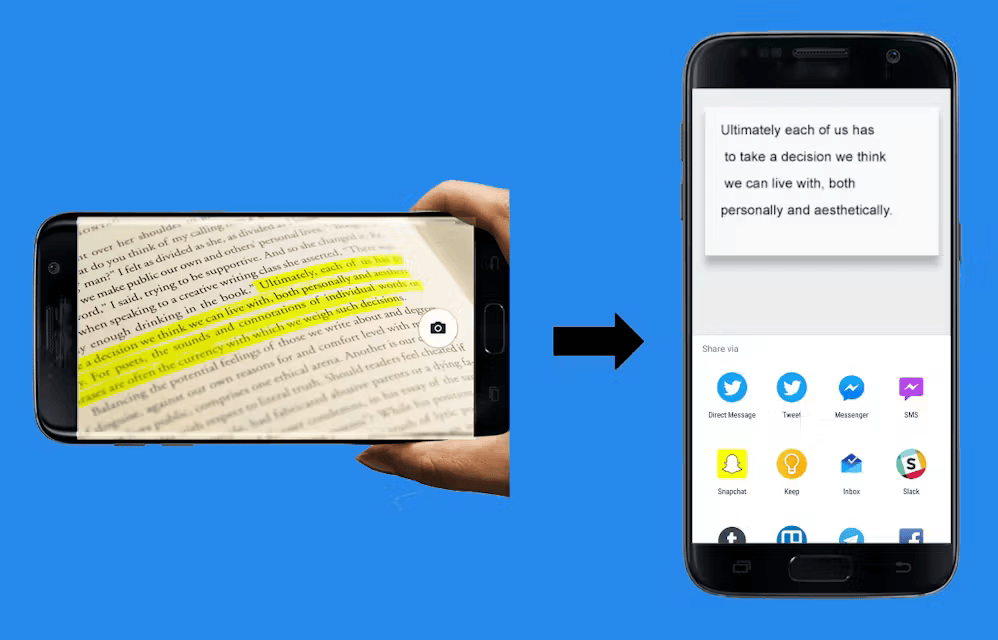
It would use the visual markers to create a schema of the scanned text information, was my goal to create with the app.
It was my attempt to create a mobile camera scanner that could digitize my written notes to digital without using any UI interaction. That was my idea.
Using markers around the information – It would convert them into various information types such as title, subtitle, list, to-do list, table etc. And further I wanted to create digital workflows using markers and handwritten information.
For example, I would write a message on paper and mark Mom with underline near the text, and the scanner after capturing this with camera – it would convert the text to digital and SMS the text to my Mom from contacts. And some other similar communication workflows.
It would make a classic fusion of traditional information techniques and the modern digital information, I thought.
💻 Implementation
OCR was a core aspect of the application. I needed to convert handwritten or scanned text from a paper with camera to digital text. I wanted to create a digital version of my written notes or a text from a printed sheet.
I wanted to use markers as a way to give a command to the app to save the information in a certain format. Such as, If I had marked a start around a paragraph, I wanted the app to save the paragraph only from the entire sheet of text. Similar features like these.
I started to research various ways to scan text using camera which is OCR in computer terms. I found two options for OCR,
One was a Native option.
Second was a Non-Native API option.
At the time there were APIs one of which was Google Vision API, I’m sure it must be around today in some way or form.
Native was less accurate.
Non-native API was more accurate.
Here, Native means, one which runs on the mobile hardware itself and hence it doesn’t need to use network or internet. It runs on the mobile hardware itself. It uses byte code already compiled on computer to analyze images and convert them to digital text. Its way less expensive than using an API, in fact its free to use.
You need to train a model on your computer with handwritten text, and create a train model which can convert any text image to digital text with ~90% accuracy.
And Non-native means, a web service that can be connected to over network and it can be used to achieve the same application.
Native option was free, API option was paid.
🚀 Launch
So as a solo developer, and wanting to make this a free application to download, although I ended up charging a 1$ price to activate a pro feature later because I had put so much effort in making the app and I wanted to monetize it, I went with the Native free option. It was Tesseract by Google. It was not very easy to implement. It was Tesseract by Google, it can be trained with handwritten text images and then can be used to scan a bitmap image with text in it and the algorithm converts to digital text.
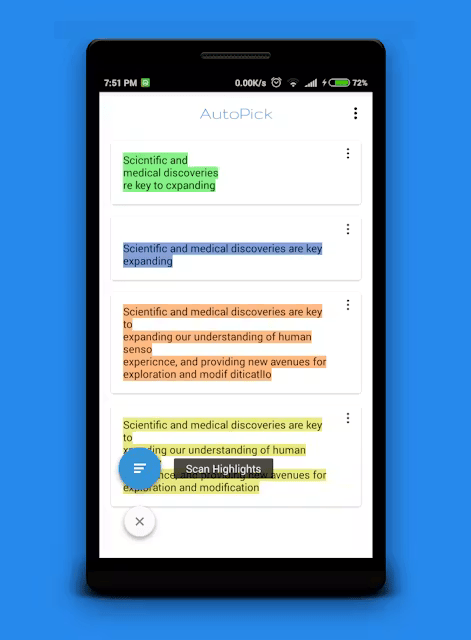
I then developed an Android app using the tesseract build, alongside I used OpenCV package for Android, Initially I wanted to use color highlights on paper to target text to convert using OCR and save only that text to notes in the app. I had thought that I would launch this use-case first and then introduce other marking techniques as well.
It was a cool use case. To identify the text with highlighted color, and to convert the text enclosed in the highlight using OCR. I used OpenCV using it I was able to select an area on screen which had the same highlighted color. So using OpenCV, user was able to click on a highlighted text on screen while the camera scanned the text, and scan only that text to notes.
Finally, I launched this application on Android, and then I also launched it to Producthunt.
The link is still alive. I had even created a website to demonstrate the use of this application. Its shut down a long time ago. I did all this alone. One thing I realized after launching this app, is that it could have worked even better and gotten even more users if I had involved more developers and techies in the project. If I had done more user research on the use-cases. Which would have given me more confidence in continue working on the app and develop more features.
📝 Find-outs and Learning
I had not done any user research. I had not taken any feedback on the app idea or its implementation. So I did not know what to do further of this app. So I just let it continue exist on Play Store and moved on to other projects. Even if I wasn’t financially awarded for the development of the app, I learned so much about product launch, product market fit, product roadmap etc. that I am sure it would help me in some other endeavor.
Leave a Reply